
Almost every restaurant I have worked with keeps two sets of numbers. One lives in the POS: every bill, every payment, every day, accurate to the rupee. The other lives in the accounting software, where somebody re-types a summary of those sales once a month so the books can be closed and returns filed. The second set exists only because the two systems have never spoken to each other. It is also where the errors are. I spent the last few weeks closing that gap in MealNix, the restaurant billing and management SaaS I build, by shipping a direct Zoho Books integration. This is what that actually took.
What the Integration Does
The scope is deliberately narrow, because accounting data should be boring. When an order is settled in the POS, it is posted to Zoho Books as a sales invoice with its payment already recorded against it. If the guest is not in Zoho Books yet, the contact is created. If the dish has never been sold before, the item is created with its rate. If the tax on that item does not exist on the Zoho side, it is created and applied. Nothing is summarised, batched into a daily journal, or rounded on the way across — what the guest paid is what the invoice says. Unpaid and cancelled orders never leave the POS.
That narrowness is the design. An accounting sync that tries to be clever is an accounting sync nobody trusts, and the moment an owner stops trusting the numbers they go back to re-typing them, which puts you worse off than before you started.
Every Restaurant Brings Its Own Zoho API Client
The first real decision was whose OAuth application this runs under. The convenient option is one shared client, registered by me, that every tenant authorises. It gives the smoothest onboarding: the restaurant clicks Connect and never sees a credential. I did not do that, and I would not do it again in a multi-tenant product that writes to customers' financial records.
A shared client makes one API application the single point of failure for every restaurant on the platform. Rate limits are pooled, so a high-volume outlet degrades everyone. A rotated or suspended secret disconnects the entire customer base at once. And the restaurant has no independent record of what has access to its books — revoking me means revoking everyone. So each restaurant creates a Server-based Application in the Zoho API console under its own account and pastes the Client ID and Secret into MealNix. Onboarding costs about five extra minutes; in exchange the blast radius of any credential problem is exactly one tenant, and the owner can see and revoke the grant from their own Zoho account without asking me.
The Data Centre Trap
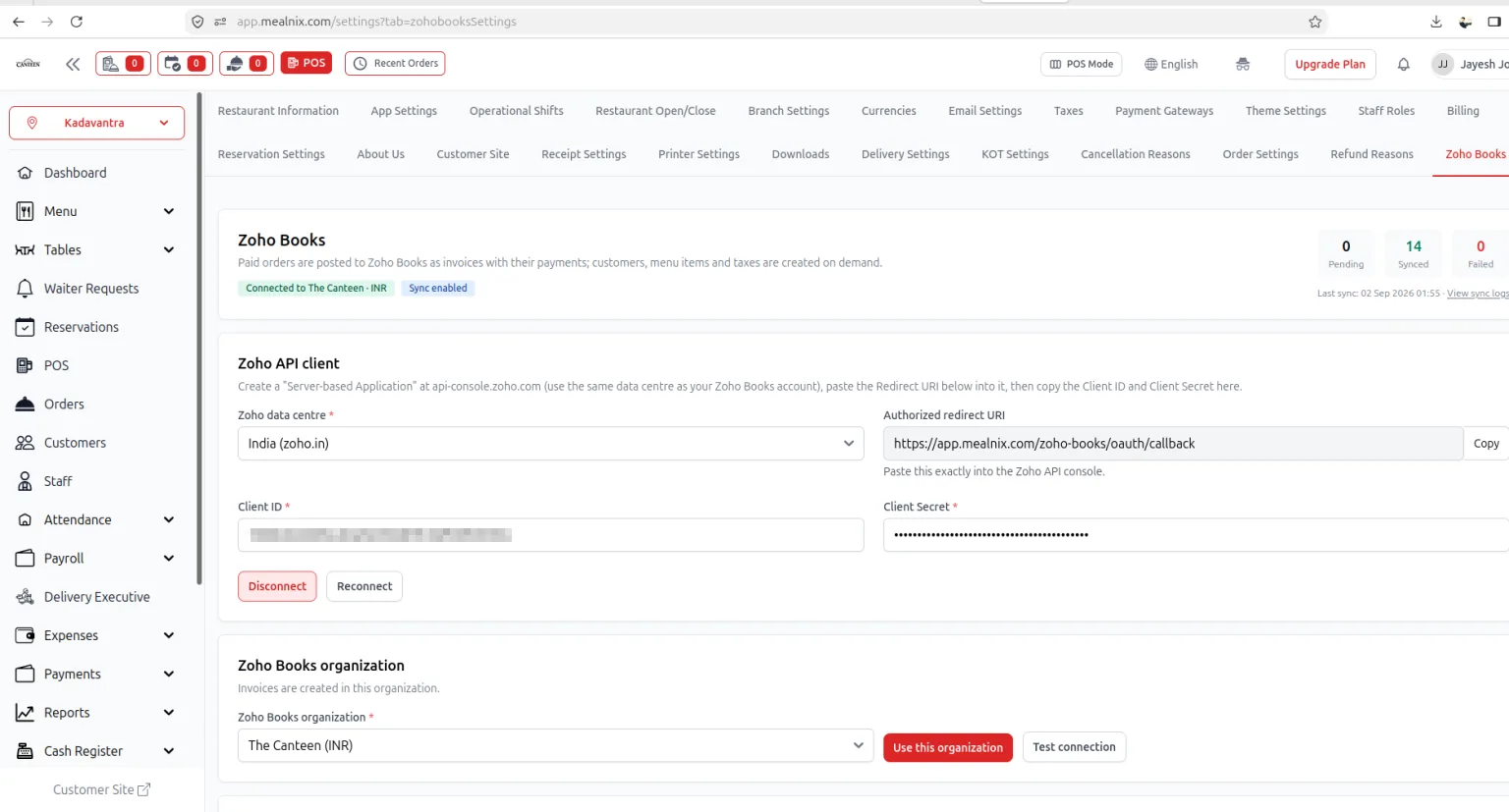
Zoho is not one system. An account on books.zoho.in and an account on books.zoho.com live in separate data centres with separate API consoles, separate accounts servers, and separate API hosts. Credentials issued in one will never authenticate against the other, and the error you get back when you mix them is unhelpful enough that a first-time integrator can lose an afternoon to it.
The fix is not clever code, it is refusing to guess. The data centre is an explicit field in the settings form, sitting directly above the credentials it applies to, and every Zoho URL the integration builds — the authorisation endpoint, the token endpoint, the API host — is derived from that one selection rather than hardcoded. It is a small piece of configuration that removes an entire class of support ticket, and it is the first thing I would build into any Zoho integration now.
Prove the Connection Before You Trust It
A Zoho login can own several organisations, and picking the wrong one means invoices land quietly in the wrong set of books — a failure that looks like success until month-end. So the connection is not treated as usable the moment OAuth returns a token. MealNix fetches the organisation list, shows each one with its base currency (the screenshot above shows The Canteen in INR), and requires an explicit choice. A separate Test connection button performs a real authenticated round-trip so the owner can confirm read and write access before a single order is at stake.
Currency matters here more than it first appears. If the selected organisation's base currency does not match what the restaurant actually bills in, every invoice arrives needing a conversion, and the accounting fix afterwards is far more painful than the thirty seconds it takes to check up front. Showing the currency next to the organisation name is a one-line change that prevents a genuinely expensive mistake.
Create on Demand — But Exactly Once
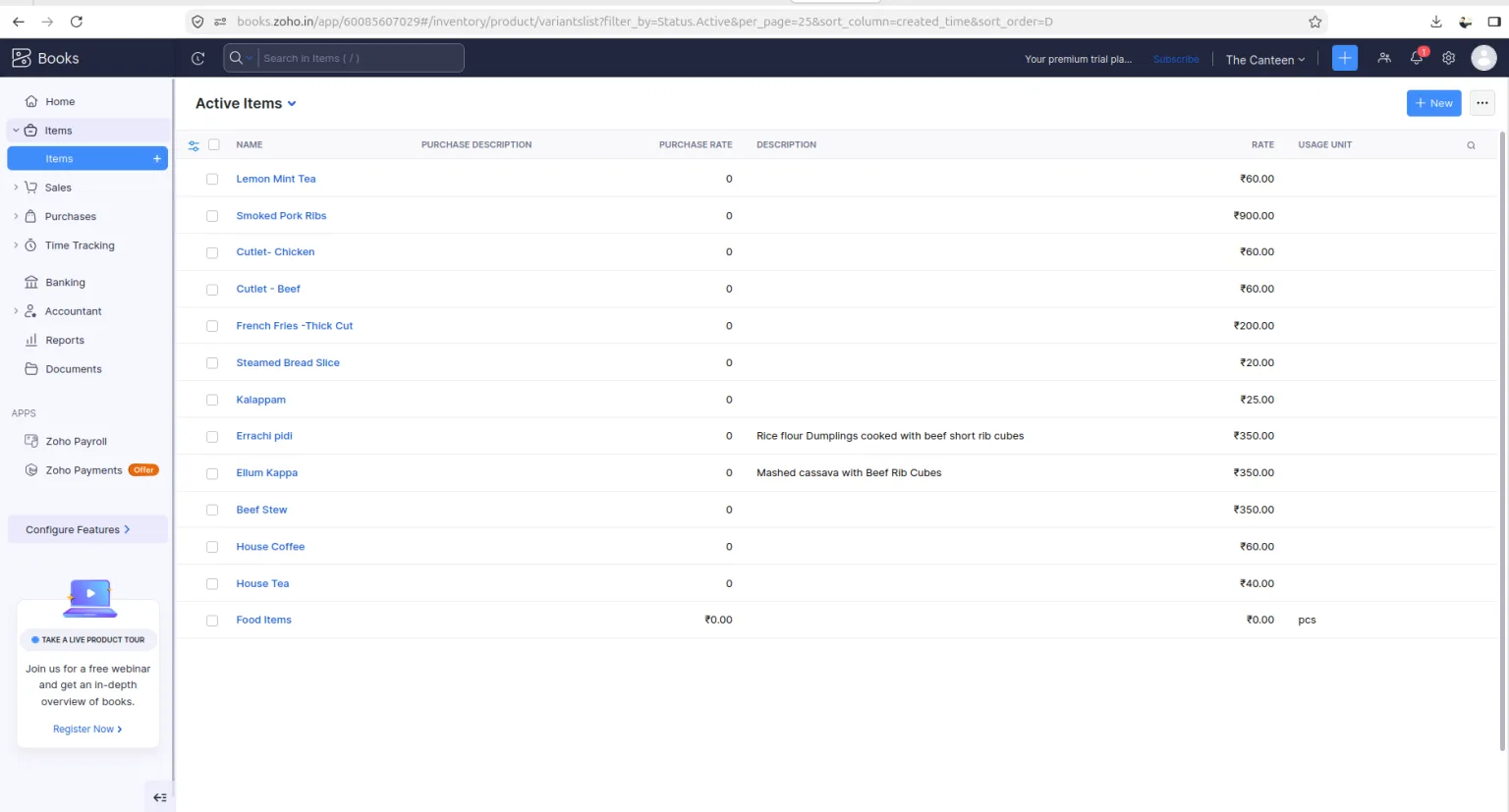
Customers, menu items and taxes are created in Zoho Books lazily, the first time they are needed, rather than through an upfront bulk push. Bulk migration sounds tidier and behaves worse: it copies across dishes that were retired two years ago, burns API quota on records that may never be sold, and fails as one big opaque operation. Lazy creation means the item list on the accounting side becomes an accurate picture of what the restaurant actually sells.
The requirement that makes this work is idempotency. Every created record's Zoho identifier is stored against the local record, so the second sale of Lemon Mint Tea reuses the item created by the first rather than making a duplicate. Without that mapping, a busy Saturday produces a menu with two hundred copies of every dish, and cleaning up duplicated items in a live accounting system is not a task anyone should have to do. Any integration that creates records in someone else's system needs this from day one, not after the first incident.
Make the Sync Something an Owner Can See
Posting an invoice to a third-party API during checkout is not an option. Zoho can be slow, rate-limited, or briefly unavailable, and none of that is an acceptable reason to make a guest wait at the counter or to fail a payment that has already happened. Every sync is queued and retried out of band, which means the POS never blocks on the network — and it also means the work becomes invisible unless you deliberately surface it.
That is what the three counters on the settings screen are for. Pending is what is queued, and should be near zero within a minute or two. Synced is what posted successfully. Failed is what Zoho rejected, and each failure keeps the reason in a sync log the owner can open. Together with the last-sync timestamp, that panel answers the only question a restaurant owner really has — are my books current? — without them opening Zoho Books at all. The screenshot above is a live account reading 0 pending, 14 synced, 0 failed.
Rejections are almost always configuration rather than code: a tax that does not exist, a contact name the API will not accept, a stale token. Naming the cause per order turns what would be a support conversation into something the owner fixes themselves in a minute.
What I Would Tell Anyone Building an Accounting Integration
Five things I would carry into the next one. Keep the scope narrow and refuse to summarise — a sync that transforms data is a sync people audit instead of trust. Store the remote identifier for every record you create, before you write the first one. Make the environment explicit rather than inferring it, because ambiguous configuration produces the worst errors. Never let a third-party API sit in the path of a payment. And build the observability in the same commit as the feature, not after the first customer asks why their invoice is missing — the counters and the sync log did more for adoption than any amount of retry logic.
None of this is exotic engineering. It is roughly two weeks of careful work, most of it spent on the failure paths rather than the happy one, and the payoff for the restaurant is that month-end stops being an event. The books are current every night, the GST return matches the till because nobody re-keyed it, and the accountant opens their own tool and finds everything already there.